
Curriculum
- 1 Section
- 6 Lessons
- 2 Hours
How to Use ULTRA on Multiple Time Frames Simultaneously
You can use the ULTRA system simultaneously across multiple time frames or in multiple modes. However, to do so, you'll need to adjust some settings for the ULTRA BOT utility.
So, if you want to use the Ultra system on both the M15 and H1 time frames simultaneously on the same platform, you need to configure the utility’s settings to mark its orders with a special “Magic Number.” The utility will automatically add this magic number to every order, and it will then be able to distinguish between trades executed on the M15 timeframe and those on the H1 timeframe.
PLEASE NOTE: When trading via a smartphone, you cannot set a "magic number." This feature is only available if you use the utility panel to trade—that is, if you place trades using its trading buttons.
If you want to trade on two time frames and use your smartphone to place trades, I would recommend the following approach:
- Set up the ULTRA system on the M15 timeframe without any "magic numbers." In this case, you can place trades using your smartphone, and the utility (which will be running on your PC at that time) will manage those trades.
- Set up the ULTRA system on the H1 timeframe, labeling each order with a magic number. In this case, you won’t be able to trade based on H1 signals on your smartphone. However, signals on the H1 timeframe occur much less frequently than on the M15, and you’ll be able to execute trades on the H1 with a delay once you get to your home PC or VPS (where the ULTRA system is installed).
ATTENTION! If you install the ULTRA system on a large number of price charts, your MT5 platform will run out of RAM. This is because the ULTRA system uses large arrays of historical price data and displays a large number of graphical objects simultaneously. As a result, your MT5 platform will have difficulty processing so much information at once.
So, if you want to open more than 25 price charts on your MT5 platform, you'll need to use a good PC or a powerful VPS server!
TO FIND OUT WHERE TO SET THE MAGIC NUMBER FOR THE UTILITY, SEE HERE:
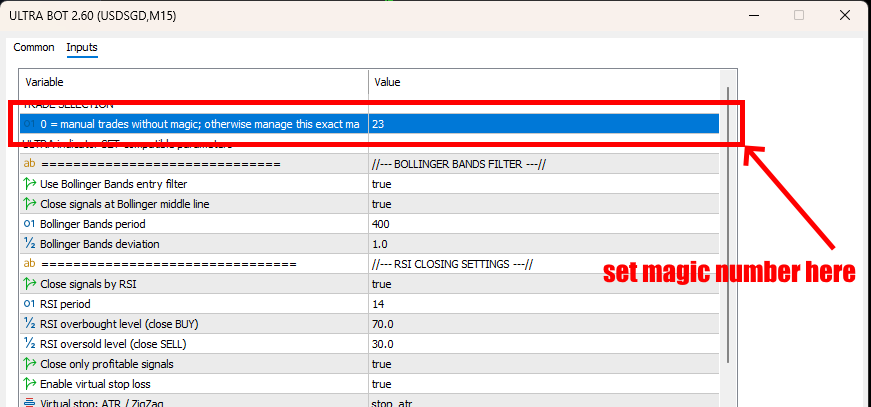
So, you need to set the magic number in the ULTRA BOT settings on all price chart windows where ULTRA BOT is installed.
Let me repeat: the magic number is set only if you place trades using the trading buttons in the ULTRA BOT utility.
If you place a trade on your smartphone, that trade will not have a magic number, and ULTRA BOT—for which you have enabled the option to manage only orders with magic numbers—will not manage that trade.